
A fast internet plan can’t fix a weak link between your mesh router and its satellites. If your Orbi system has Ethernet wiring available, a Netgear Ethernet backhaul can give each satellite a steadier connection than Wi-Fi alone.
This Ethernet backhaul setup is useful for busy homes, home offices, gaming rooms, and areas where walls weaken coverage. It also helps you get more value from the mesh system you already own.
This guide focuses on Orbi systems with Ethernet wiring. Nighthawk Mesh products may have different model support and setup instructions.
This post may contain affiliate links. If you make a purchase through these links, I may earn a small commission at no extra cost to you.
Key Takeaways
- A Netgear Ethernet backhaul connects Orbi satellites to the router through Ethernet, reducing wireless backhaul traffic and improving consistency, latency, and coverage.
- Use the layout modem or ONT -> Orbi router WAN port -> router LAN port -> downstream switch -> satellites, keeping all satellites downstream of the router.
- Update every Orbi unit, test with known-good cables, and match the router, switch, satellite, and client devices to the Ethernet speed you need.
- A star topology with one central unmanaged switch works for most homes, while daisy chaining depends on model support and must not create a network loop.
- Ethernet does not increase the speed of your internet plan, but it can make remote rooms, gaming, video calls, and local transfers more reliable.
Why Ethernet Backhaul Can Improve an Orbi System
An Ethernet backhaul is the wired path between a mesh router and one or more Orbi satellites. This backhaul connection uses Ethernet cables instead of a wireless backhaul.
Your phones, TVs, laptops, and smart home devices still connect over Wi-Fi through the mesh router or mesh satellite. That client-facing traffic is called fronthaul; the cable carries node-to-node traffic instead of a wireless backhaul.
What changes when satellites use Ethernet
A wired backhaul reduces the wireless traffic competing for airtime. That can improve network efficiency when several people are streaming, gaming, working from home, or transferring files at once. Some systems reserve a dedicated backhaul on the 5GHz band or 6GHz band, but Ethernet avoids that radio hop.
It can improve consistency and latency in difficult coverage areas. A mesh satellite in a basement, detached office, or far bedroom may have a weak link to the main router. A good Ethernet run removes that hop.
For a desktop PC, game console, work dock, or NAS, a wired network is still the best choice when the device stays in one place. Ethernet usually provides steadier throughput and lower latency than Wi-Fi, even when measured connection speed looks similar.
When it may not change much
Don’t expect Ethernet backhaul to raise your internet plan speed beyond what you pay your provider for. A 500 Mbps plan is still a 500 Mbps plan.
The improvement is usually more noticeable when the mesh system was struggling before. If your satellites already have strong wireless links and your home has a sub-gigabit plan, speed tests may look similar. Reliability is where Ethernet earns its place.
Ethernet improves the path inside your home. It does not bypass a slow modem, ISP outage, or internet plan limit.
Prepare Your Orbi System Before Connecting Cables
A clean Ethernet backhaul setup starts with checking the whole network path. One older switch, damaged cable, or mismatched firmware version can create a problem that looks like a mesh system issue.
Complete the firmware update on every Orbi unit
Run a firmware update on the Orbi router and every satellite before changing the backhaul. Updates can fix stability issues and help all nodes work properly together.
The Orbi app can check for available updates under Settings and Router Settings. Netgear also provides steps to update Orbi system firmware. If you need to update an Orbi satellite manually, use Netgear’s satellite firmware update instructions.
Let every unit come back online before moving to the next step. Don’t unplug a satellite during an update.
Check cables, wall jacks, and port speeds
For most normal home runs, a good Cat5e Ethernet cable is enough for Gigabit Ethernet and often works for 2.5GbE too. You don’t need to replace every cable with Cat6 before testing.
Start with a short, known-good Cat5e or Cat6 cable. If that works but an in-wall run does not, inspect the wall jack, connectors, bends, and termination.
Match the slowest part of the path to your goal:
| Internet or Local Need | Practical Backhaul Hardware |
|---|---|
| Plans below 1 Gbps | Gigabit router ports, Gigabit Ethernet switch, healthy Cat5e cable |
| 1 Gbps plan with room for overhead | Gigabit works, 2.5GbE adds upgrade room |
| 2 Gbps plan or fast NAS transfers | Matching 2.5GbE ports and switch |
| Orbi 970 local network | Matching 10 Gbps ports, switch, cables, and client hardware |
A multi-gig port doesn’t make every device faster. The router, switch, satellite, cable, desktop, dock, and NAS all need support for the same rate.
Orbi Ethernet Backhaul Setup Steps
The basic layout is simple: your modem or fiber ONT connects to the Orbi router’s Internet or WAN port. The router then feeds a downstream Ethernet switch or an approved satellite path from its LAN side. This backhaul connection can lower latency compared with a wireless backhaul.
Netgear’s official Orbi Ethernet backhaul setup guide shows the standard star layout for supported systems.
Connect the main router first
Keep your existing connection in place:
- Connect the modem, ONT, or ISP gateway to the Orbi router’s Internet or WAN port.
- Connect an Ethernet cable from the Orbi router’s LAN port to an Ethernet switch, or directly to one Orbi satellite where supported.
- Connect each satellite to the downstream switch or approved wired path.
- Power on the router and let it fully connect to the internet.
- Turn on each satellite and give the system several minutes to recognize the wired connection.
The yellow Internet port on many Orbi routers is for the modem or ISP gateway. It isn’t the port for a switch that feeds satellites.
Let satellites join before troubleshooting the cable
If a satellite doesn’t appear after you plug it in, disconnect the cable temporarily. Let it sync with the router over Wi-Fi first, then reconnect the cable.
This lets the satellite establish its initial wireless relationship before switching to the wired backhaul. That simple reset of the connection order fixes many setup problems.
If an ISP gateway still routes traffic, check your network mode. Use Orbi Router Mode when the gateway is bridged. If the gateway must remain the router, Orbi Access Point Mode can help prevent double NAT and routing conflicts. More RouterForMyISP setup guides can help with that decision.
Choose Star Topology or Daisy Chain Carefully
Your home’s existing wiring usually decides which layout is practical. A star topology is often best when each satellite can connect directly to one central switch. Both layouts must keep every satellite downstream of the router and avoid a network loop.
Star topology works for most homes
This layout places one central switch behind the router. Each mesh satellite gets its own cable run from that switch.
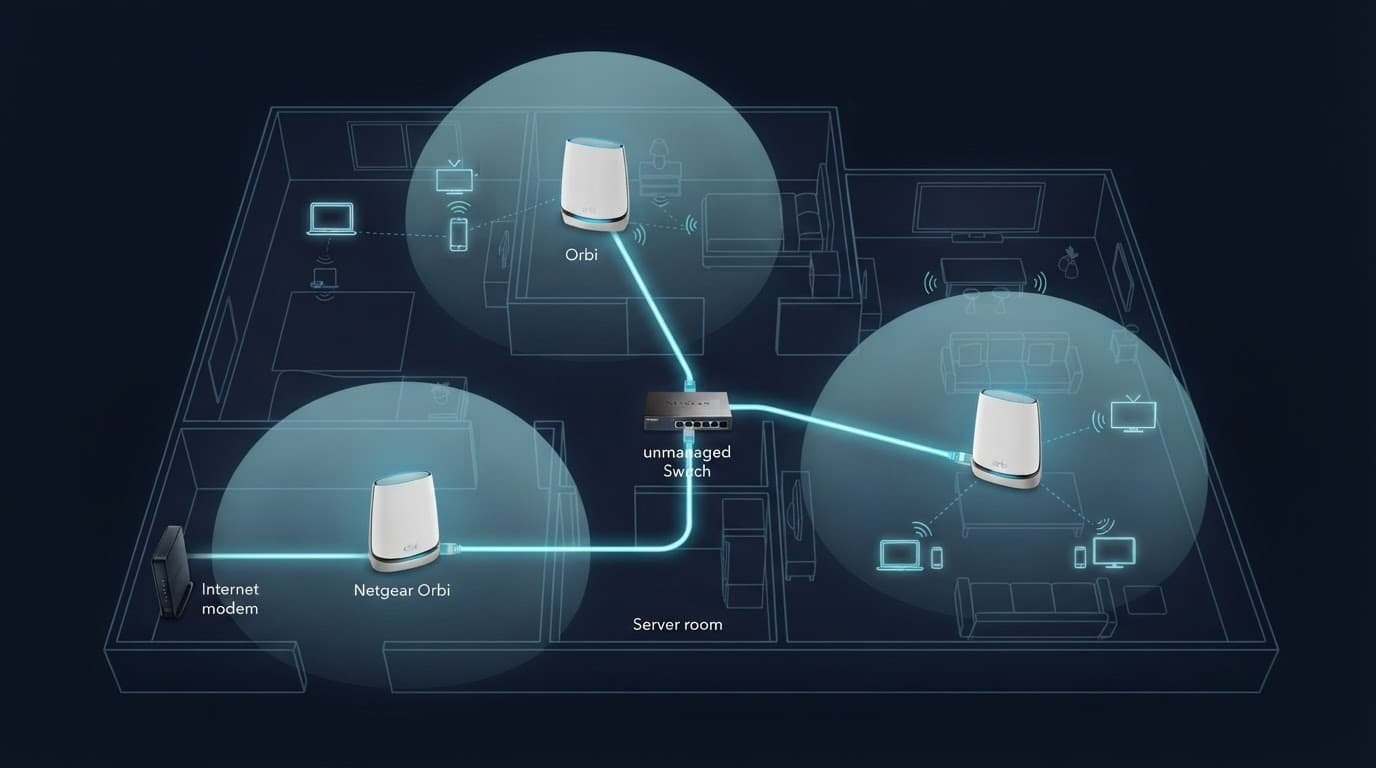
For Ethernet backhaul, this is usually the cleanest choice for a home with Ethernet wall jacks. The layout looks like this:
Modem or ONT -> router WAN port -> router LAN port -> central switch -> satellites
Use a basic unmanaged Ethernet switch when possible. Managed switches can work, but settings such as VLANs, loop protection, or spanning tree controls can complicate a home mesh setup.
For compatible Gigabit and multi-gig hardware, compare current switches, cables, and adapters at Better WiFi Shop.
Daisy chain has model limits
A daisy chain topology connects the router to one satellite, then connects that satellite to another satellite. It can help when only one Ethernet run reaches the first remote room.
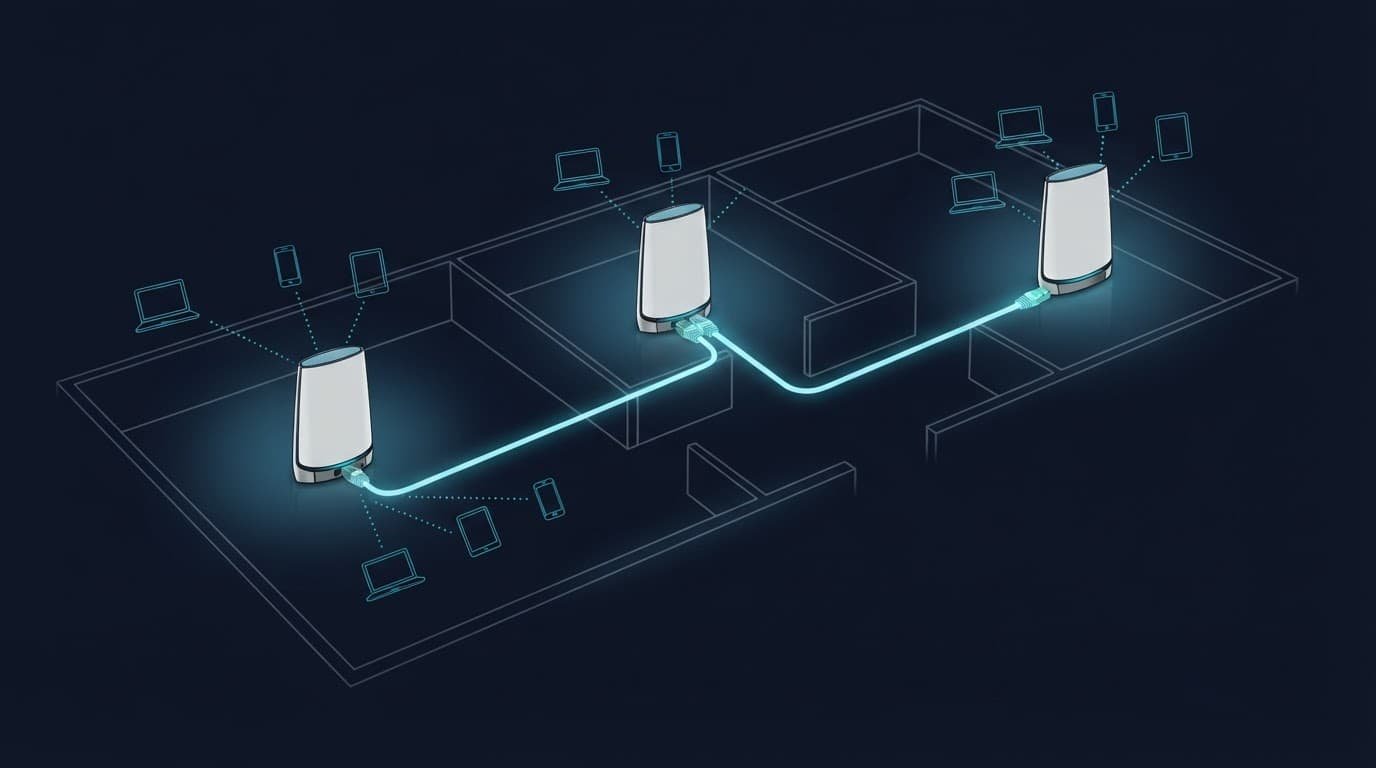
Don’t assume every older Orbi model supports satellite-to-satellite wired connections. Check your model’s documentation first. Netgear confirms that the Orbi 970 supports router-to-satellite and satellite-to-satellite wired connections.
Never connect a satellite to both Wi-Fi and Ethernet through separate network paths that create a loop. Also avoid placing the satellite switch on the modem side of the router, since that can bypass the intended backhaul connection.
Use the Right Switch and Ethernet Speed
A Gigabit Ethernet switch is enough for most Orbi owners. It supports internet plans up to 1 Gbps and works well for regular streaming, work calls, and gaming.
Buy a 2.5GbE or 10 Gbps switch only when the rest of the path supports it. That may include a multi-gig internet plan, local NAS transfers, or newer WiFi 7 hardware such as the Orbi 970.
Find the bottleneck before spending more
In practice, after normal overhead, a 2.5GbE backhaul may deliver roughly 275 MB per second. Gigabit Ethernet is closer to 110 MB per second.
This difference matters for a 100 GB backup, video project, or photo library, but far less for email, web browsing, or a single 4K stream. Faster local links can reduce latency during large transfers, but they won’t change latency on a slower internet service.
Before buying a new switch, check these items:
- Your modem or ONT must have a port that supports your internet plan.
- The Orbi router needs a matching WAN port for internet speed and LAN port for local traffic.
- The switch and satellites need matching Ethernet speeds.
- Your computer or NAS needs a multi-gig port for faster local transfers.
- Slow hard drives can still limit a NAS, even on a fast network.
If a link stays at 1 Gbps, test another cable and another port before replacing equipment. A damaged connector or poor wall jack is often the real cause.
Orbi 970: Wired Backhaul vs. WiFi 7 MLO
The Orbi 970 differs from older systems because its wireless backhaul is designed for high capacity. Netgear’s design uses WiFi 7 Multi-Link Operation, or MLO, across the dedicated 5GHz band and 6GHz band.
Multi-Link Operation coordinates multiple links for the backhaul connection between Orbi nodes. MLO can combine traffic across those paths, improving capacity and latency. Fronthaul traffic serves phones, laptops, and other client devices.
The dedicated backhaul keeps node-to-node traffic separate from fronthaul traffic. The 6GHz band adds spectrum, while distance and walls can affect its range. This separation can reduce contention and latency for fronthaul devices.
Netgear says this wireless design can provide up to 10 Gbps of backhaul Wi-Fi capacity in the right conditions. That’s a theoretical capacity figure, not a guarantee of real-world throughput. Read the details in its Enhanced Dedicated Backhaul overview.
When wired still makes sense on Orbi 970
Ethernet remains preferable when your home has wiring and you want the most stable satellite link. It removes radio interference from the node-to-node path and leaves more airtime for client devices.
The router includes a 10 Gig Internet port, a 10Gbps LAN port, and four 2.5Gbps LAN ports. Each satellite includes a 10Gbps LAN port plus two 2.5Gbps LAN ports. Netgear lists these wired options on its Orbi 970 product page.
You can mix wired and wireless satellites
A large home doesn’t need Ethernet in every room. Use a wired link for satellites near Ethernet runs and a wireless link for a satellite in a location without cabling.
That mixed setup is practical for a basement office, upstairs bedrooms, or a detached room. Start with wired links where the signal has the hardest trip, then use wireless satellites where running cable would be expensive or impractical.
Older WiFi 5 and WiFi 6 client devices don’t gain these features directly. They can still benefit indirectly from reduced congestion and a stronger node connection.
Confirm the Wired Backhaul Is Working
Don’t rely only on a speed test. A client speed test near the router cannot prove a remote satellite is using Ethernet. Check latency from the satellite’s room as well, since a fast result near the router proves little.
Open the Orbi app and inspect the network map. Solid lines between the Orbi router and Orbi satellite usually indicate a wired connection; dotted lines may indicate wireless backhaul. Icons and line styles vary by firmware, so treat them as clues. Confirm the satellite’s backhaul connection status in the app and, when available, under Attached Devices at orbilogin.net. On an Orbi 970, verify its WiFi 7 MLO status before judging the link from performance alone.
Fix common wired backhaul problems
If a satellite shows offline, reconnect it near the router with a short, known-good Ethernet cable. This helps separate a cable issue from a pairing issue.
When a satellite connects but the connection speed is low, replace the cable first. Then check the switch port’s negotiated speed. Restart the router, switch, and satellite in that order.
If the network becomes unstable after adding a switch, simplify the layout. Remove extra connections, use one switch behind the router, and avoid advanced switch settings until the basic setup works.
A working Netgear Ethernet backhaul should feel boring. Video calls stay stable, gaming latency stops jumping around, and distant rooms perform more like rooms near the main router.
Frequently Asked Questions
What is an Ethernet backhaul?
An Ethernet backhaul is the wired connection between an Orbi router and its satellites. It carries node-to-node traffic over Ethernet instead of using a wireless backhaul, while phones and other devices continue connecting over Wi-Fi.
How do I connect Orbi satellites for Ethernet backhaul?
Connect the modem or ONT to the Orbi router’s WAN port, then connect a LAN port on the router to a downstream Ethernet switch. Connect each satellite to that switch, or use a directly approved satellite path for models that support it.
Do I need an Ethernet switch for Orbi wired backhaul?
A switch is usually the easiest choice when multiple satellites use Ethernet wall jacks. A basic unmanaged Gigabit switch is enough for most homes, while 2.5GbE or 10GbE hardware is only useful when the rest of the network supports those speeds.
Can Orbi satellites be connected in a daisy chain?
Some Orbi models support a wired connection from one satellite to another, but older models may not. Check your model documentation first, and avoid connecting separate paths that could create a network loop.
Does Ethernet backhaul make my internet plan faster?
No, Ethernet backhaul cannot exceed the speed provided by your ISP or fix a slow modem or outage. Its main benefits are a steadier satellite connection, lower internal latency, and less wireless congestion inside the home.
A Better Wired Orbi Setup Starts With the Full Path
Start with the full path: modem or ONT to the mesh router’s WAN port, then router LAN to the switch. Connect the switch to the satellites, and match every link to the required speed, including 10 Gbps when supported.
An Ethernet backhaul keeps the mesh system dependable, even when Wi-Fi crosses floors or thick walls. An Orbi 970 can use WiFi 7 and MLO, but the full path still matters. A Netgear Ethernet backhaul removes the weakest link, improving reliability, coverage, and latency without promising a faster ISP plan.