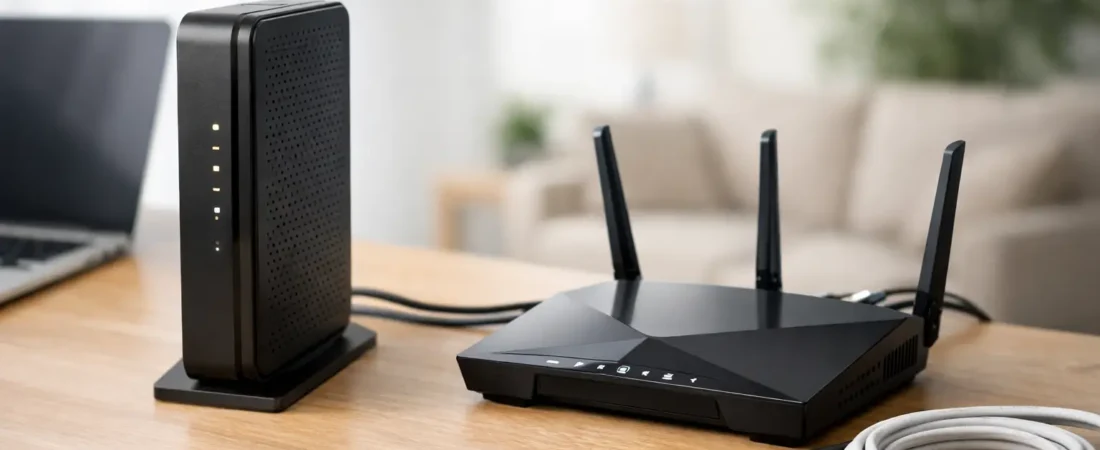
Your internet bill says one thing, your ISP app says another, and the box by your TV stand has blinking lights you did not ask for. If you’re wondering, do I need a modem, the short answer is: maybe. It depends on the kind of internet service you have, whether your provider gave you a combined gateway, and whether you’re trying to replace rental equipment with your own gear.
This is one of the most common points of confusion for home internet shoppers because people often use modem and router like they mean the same thing. They do not. And if you buy the wrong one, you can end up with equipment that either does nothing or simply will not work with your ISP.
What a modem actually does
A modem connects your home to your internet provider’s network. Think of it as the translator between your ISP’s incoming signal and your home network. Without that translation step, your router cannot get internet access on its own.
A router does a different job. It takes that internet connection and shares it with your devices over Wi-Fi or Ethernet. So if you have separate equipment, the modem brings internet into the house, and the router spreads it around.
That distinction matters because many households do not have two separate boxes anymore. They have one ISP-provided gateway, which combines a modem and router into a single unit. If that is what you already have, you may not need to buy a standalone modem unless you want to replace the provider’s gear.
Do I need a modem or just a router?
Here is the practical answer: if your ISP uses cable internet, you usually need a modem. If you already have a modem or gateway from your provider, then you may only need a router if your goal is better Wi-Fi.
This is where people get tripped up. They have slow coverage upstairs or weak streaming in the back bedroom, so they assume the modem is the problem. In many homes, it is not. The issue is often the router’s Wi-Fi performance, range, or device handling.
If your current setup is a single gateway from the ISP, adding a better router or mesh system can solve the problem without changing the modem side at all. In some cases, you can put the gateway in bridge mode and let a stronger router handle the network.
When you do need a modem
You need a modem in a few very specific situations.
You have cable internet
If your provider is using cable infrastructure, such as Xfinity, Spectrum, or Breezeline, a modem is typically required. You can rent one from the ISP or buy your own compatible model. If you buy your own, compatibility matters. Not every cable modem works on every provider, and speed tiers can affect which models make sense.
You want to stop paying equipment rental fees
This is one of the biggest reasons people shop for a modem. If your ISP charges a monthly fee for its gateway or modem, buying your own can pay off over time. But the savings only make sense if your provider allows customer-owned equipment and your service type supports it.
Your ISP gave you only a modem
Some providers still install a standalone modem with no built-in Wi-Fi. In that case, yes, you need the modem, and you also need a router if you want wireless internet throughout the house.
When you do not need a modem
There are also plenty of cases where the answer to do I need a modem is no.
You have fiber internet with an ONT
Fiber providers like Verizon Fios and AT&T Fiber usually do not use a traditional cable modem. Instead, the signal comes into an ONT, or optical network terminal. That device serves a similar connection role, but it is not the same thing as a cable modem.
In many fiber setups, the ONT is already installed by the provider, and what you need next is a router, not a modem. That is why people moving from cable to fiber often get confused. They are used to shopping for modem/router combos, but on fiber, the modem part may be irrelevant.
You already have a modem/router combo
If your current ISP equipment is a gateway, then you already have a modem function built in. Buying another modem would be unnecessary unless you are replacing the gateway entirely with a compatible device.
You have fixed wireless, 5G home internet, or satellite
These services usually rely on provider-specific equipment. You may still be able to use your own router behind that equipment, but you generally do not shop for a standalone modem the way cable customers do.
How to tell what kind of internet you have
If you are not sure whether you need a modem, start here. Your internet type usually gives you the answer faster than any product page.
If you have a coax cable going into your internet box, that strongly suggests cable internet, which usually means modem required. If your service comes through fiber and there is an ONT on the wall or in a utility area, you probably do not need a modem. If your provider gave you one all-in-one box with Wi-Fi built in, you may already have everything required and only need to decide whether you want better performance.
You can also check your ISP account page or equipment label. Terms like cable modem, gateway, ONT, fiber jack, and wireless gateway are all clues. The wording matters more than most people realize.
Modem vs gateway vs router
These terms get mixed together constantly, so it helps to keep them straight.
A modem connects to the ISP. A router creates and manages your home network. A gateway combines both jobs in one device. That means when a provider says it is giving you a gateway, you usually do not need a separate modem.
The trade-off is flexibility. A gateway is simple and convenient, but standalone equipment gives you more control. If you want stronger Wi-Fi, better parental controls, more Ethernet ports, or a mesh setup that actually covers the whole house, using your own router is often the better move.
Should you buy your own modem?
For cable internet households, buying your own modem can make good financial sense. Monthly rental fees add up, and owning your hardware gives you more control over upgrades. It can also let you pair a solid modem with a better router instead of relying on a mediocre all-in-one gateway.
But there are trade-offs. ISP support tends to be easier when you use their equipment. If there is an outage or signal issue, they cannot blame third-party gear as quickly when the hardware is theirs. And if you buy your own modem, you need to make sure it matches your provider, your speed plan, and current network standards.
That is especially true for cable customers considering older DOCSIS 3.0 models because they may be cheaper up front. For lower speeds, they can still work in some cases, but many buyers are better off with a newer DOCSIS 3.1 modem if they want longer useful life and fewer upgrade headaches.
The easiest way to decide
If you want the simplest rule, use this:
If you have Xfinity, Spectrum, Breezeline, or another cable ISP, you likely need a modem or a modem/router gateway.
If you have Verizon Fios, AT&T Fiber, or another fiber service, you usually do not need a traditional modem. You need a router that works well with the provider’s existing fiber connection setup.
If you already have internet working in the house and your only complaint is weak Wi-Fi, do not assume you need a new modem. You may only need a better router or mesh system.
That is where a lot of shoppers overspend. They replace the wrong piece of equipment and end up with the same dead spots, buffering, or work-from-home frustration.
Before you buy anything
Check your provider’s approved equipment list, verify your internet type, and identify whether your current box is a modem, router, or gateway. If you are replacing rental gear, confirm that your ISP allows customer-owned equipment on your plan. If you are on fiber, focus your attention on router performance, not modem shopping.
For households trying to lower monthly costs and improve Wi-Fi at the same time, this is usually the right order: figure out what your ISP requires first, then upgrade the part that is actually limiting performance. That is the approach RouterForMyISP is built around because the best networking purchase is not the most expensive one – it is the one that fits your provider and fixes the real problem.
If your setup feels confusing, that is normal. The good news is that once you identify your internet type, the modem question gets much easier, and so does choosing equipment you will not regret a month later.