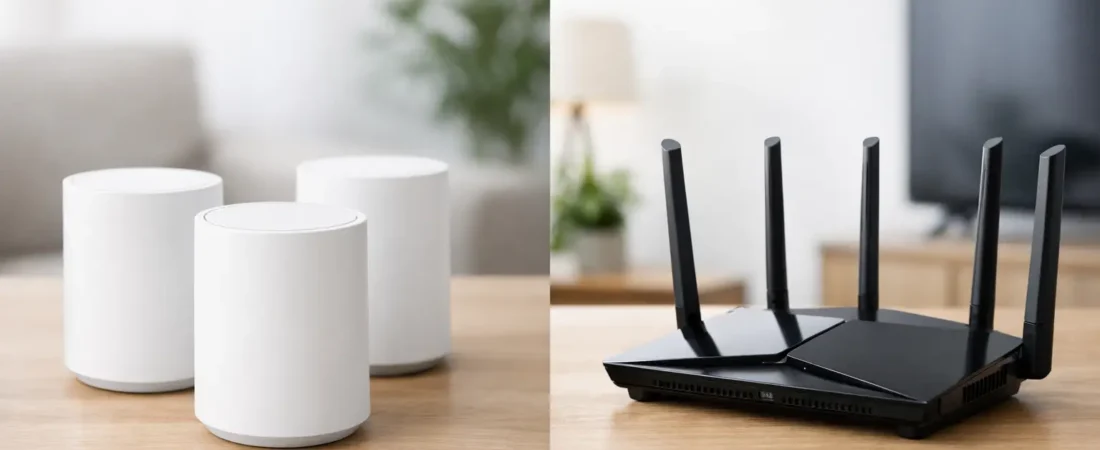
You usually start asking about mesh wifi vs router after something goes wrong. Maybe the bedroom TV buffers every night, your video calls break up in the back office, or the kids say the Wi-Fi is “fine” until gaming starts. At that point, the real question is not which option sounds more advanced. It is which one actually fits your home, your ISP, and the way you use the internet.
For many households, a traditional router is still the right buy. For others, a mesh system fixes the exact problem a single router cannot solve – coverage across a larger or more difficult space. The trick is knowing whether you need more power, more reach, or both.
Mesh WiFi vs router: what is the difference?
A router is the main device that creates your home network and sends Wi-Fi from one central point. If you buy a standalone router, all of your wireless coverage comes from that one box. That can work very well in apartments, smaller homes, and layouts where most devices stay reasonably close to the router.
A mesh Wi-Fi system also creates your home network, but it uses multiple units instead of one. You have a main unit connected to your modem or gateway, plus one or more satellite nodes placed around the house. Together, they spread coverage more evenly than a single router can.
That does not automatically make mesh better. Mesh is usually better at coverage. A good router is often better at value.
When a router makes more sense
If your internet problems are happening because your ISP gave you a weak all-in-one gateway, replacing it with a better router can be a huge upgrade. Many people do not actually need mesh. They just need a stronger router with better range, newer Wi-Fi standards, and more consistent performance.
A single router is usually the smarter choice if you live in an apartment, condo, or smaller house. It also makes sense if your home is under roughly 1,500 to 2,000 square feet and your current dead zones are minor. In those cases, spending more on mesh may not improve much.
There is also a performance angle. A quality standalone router often gives you stronger top-end speeds near the router than an entry-level mesh system. If your gaming setup, home office, or streaming devices are mostly in the same part of the house, a router can be the cleaner and cheaper answer.
This is especially true for people with cable internet plans from Xfinity, Spectrum, or Breezeline who want to stop renting equipment. A compatible modem plus a solid router can lower monthly costs and improve Wi-Fi at the same time.
When mesh Wi-Fi is the better buy
Mesh starts to make sense when your issue is clearly coverage, not just hardware quality. If the internet is fast in the living room but slow upstairs, or reliable near the router but weak at the far end of the house, a single router is working against the layout of your home.
Mesh is often the better fit for larger homes, multi-story houses, long floor plans, or places with thick walls. It can also help if you have a lot of connected devices spread across the house – smart TVs, cameras, phones, tablets, laptops, and game consoles all competing for stable coverage.
For families, this is where mesh tends to feel worth the money. You are not just chasing speed test numbers. You are trying to make the whole house usable without constant reconnecting, buffering, or moving closer to the router.
Fiber households often land here too. If you have Verizon Fios or AT&T Fiber and pay for high speeds, poor Wi-Fi coverage can make that plan feel slower than it really is. Mesh helps you use more of the speed you are already paying for in rooms that a single router struggles to reach.
Mesh WiFi vs router on speed
This is where a lot of buyers get tripped up. Mesh systems are marketed as fast, and many are. But speed and coverage are not the same thing.
A high-quality router in the same room as your device may beat a mesh system on raw wireless performance. That is because the router is sending signal directly, without relying on traffic moving between nodes. If you care about maximum speed in one main area, a strong standalone router can be excellent.
Mesh can still win in real life because it delivers more usable speed across the house. A bedroom that gets 40 Mbps from a single router might get 250 Mbps from a properly placed mesh node. So even if the router looks stronger on paper, the mesh setup may feel faster where you actually use your devices.
Placement matters here. A poorly placed mesh node can hurt more than help. Nodes should be close enough to get a strong signal from the main unit, but far enough apart to extend coverage meaningfully. If you put them at the very edge of a dead zone, performance usually suffers.
Cost is where the decision gets real
A good router usually costs less than a good mesh system. That is one reason routers remain the best value for many homes. You buy one device, set it up, and if your space is not too challenging, you are done.
Mesh systems cost more because you are buying multiple units. That higher price can be worth it if it solves a whole-home problem. But if your home does not need multiple access points, mesh can be overkill.
There is also a hidden cost issue with ISP equipment. Some providers push rental gateways and paid Wi-Fi pods or extenders. In some homes, buying your own router or your own mesh system is the better long-term deal. The exact savings depend on your provider and whether you can fully replace their equipment or need to keep part of it for service compatibility.
That is why ISP fit matters. Not every setup works the same across cable and fiber providers, and not every household can swap gear in the same way.
Router or mesh with your ISP
If you have cable internet, such as Xfinity, Spectrum, or Breezeline, you can often use your own modem and your own router. That gives you flexibility. A lot of households start with a standalone router and only move to mesh if they still have coverage issues.
If you have fiber, such as Verizon Fios or AT&T Fiber, the setup can be different. In some cases, you can use your own router more directly. In others, you may still need the provider’s gateway involved in some way. That does not rule out mesh, but it does mean you should check compatibility and setup requirements before buying.
This is one area where practical guidance matters more than marketing. The best device for your home is not just the one with the highest speed rating. It is the one that works cleanly with your provider and solves your actual Wi-Fi problem.
Mesh WiFi vs router for gaming, streaming, and work
For gaming, a router is often enough if your console or PC is near the router or connected by Ethernet. Wired connections still beat Wi-Fi for stability. If the gaming setup is far from the router and running cable is not realistic, mesh can help, though competitive players may still notice more variability than with Ethernet.
For streaming, mesh is often a strong upgrade in larger homes because it reduces weak-signal rooms. If your family streams in multiple rooms at once, better coverage usually matters more than squeezing out the highest possible speed in one room.
For work from home, it depends on where the office is. If your desk is near the router, a solid standalone unit may be perfect. If your office is upstairs, in a converted garage, or at the far end of the house, mesh often makes daily life easier.
So which should you buy?
Buy a router if you live in a smaller space, want the best value, and do not have major dead zones. It is also a smart first move if you are replacing weak ISP equipment and want better performance without spending too much.
Buy mesh if your main problem is coverage across a larger or more difficult home. It is usually the better answer for multi-story layouts, heavy device use in several rooms, and households tired of hearing that the Wi-Fi works in one room but not another.
If you are stuck between the two, be honest about your home size and where problems happen. A lot of buyers assume they need more speed when they really need better coverage. Others assume they need mesh when a quality router would do the job for less.
That is the practical way to think about it, and it is how RouterForMyISP approaches the decision. Start with the problem, match the gear to your ISP and home layout, and buy only as much network as you actually need.
Better Wi-Fi does not always come from buying the fanciest option. It comes from choosing the setup that fits your house the first time.